How to Audit Your Affiliate Links (Step by Step)

AffilGuard Team
If you run an affiliate site, some of your links are probably broken right now. Products get delisted, merchants change their URL structures, affiliate programs shut down or restructure their tracking. It happens constantly, and most people don't find out until they notice a dip in their earnings.
An affiliate link audit catches those problems before they cost you money. Here's how to do one, what to look for, and how to decide whether manual checking or automated monitoring makes more sense for your site.
How Often Should You Audit Your Links?
It depends on how many links you're managing:
Under 20 Links
Monthly manual check is fine. Open each link, confirm it loads, check your affiliate ID is in the URL.
20-100 Links
Manual checks become impractical. Weekly spot-checks on your top pages, plus a full audit monthly.
100+ Links
You need automated monitoring. Nobody is manually checking 100+ links on a regular schedule.
Amazon regularly delists and restructures product pages. Awin merchants come and go. If you're linking to specific products rather than storefronts, those links have a shelf life.
What You're Checking For
An audit isn't just "does the link load?" A link can fail you in ways that aren't obvious unless you know what to look for. For a deeper breakdown of why these problems happen, see How to Check If Your Affiliate Links Are Working.
Dead links (404s) — The product was removed or the URL changed. Visitor hits an error page, conversion gone.
Stripped affiliate IDs — The link works, the customer lands on the right page, but your tracking parameter got dropped in the redirect chain. You get no credit. Compare your original URL with the final URL after redirects. If your tag= (Amazon) or U= (Awin) parameter is missing, the redirect stripped it. See how redirect chains work for the technical details.
Slow redirects — A link that takes 4-5 seconds bouncing through multiple domains before landing on the merchant page loses visitors. Each hop in the redirect chain adds latency.
Geo-restrictions — A link that works in the US might return a 403 for visitors in Europe. You won't catch this unless you test from different locations or monitor response codes.
The Audit Process
Whether you do this manually or with a tool, the checks are the same:
tag=yourid-20. For Awin, look for your ID in the U= parameter. If it's gone, the redirect stripped it.Matching Your Approach to Your Scale
The frequency section above maps directly to the right tool for the job.
If you have fewer than 20 links, doing this by hand once a month is realistic. Open each link in a browser, check the final URL, note what's broken, fix it. A spreadsheet with link URLs, last-checked dates, and statuses is enough to keep track.
At 20-100 links, manual checking becomes something you'll keep postponing. Most people start strong, get bored partway through, and tell themselves they'll finish later. A spreadsheet still works as your record, but you need something checking the links for you between your manual reviews.
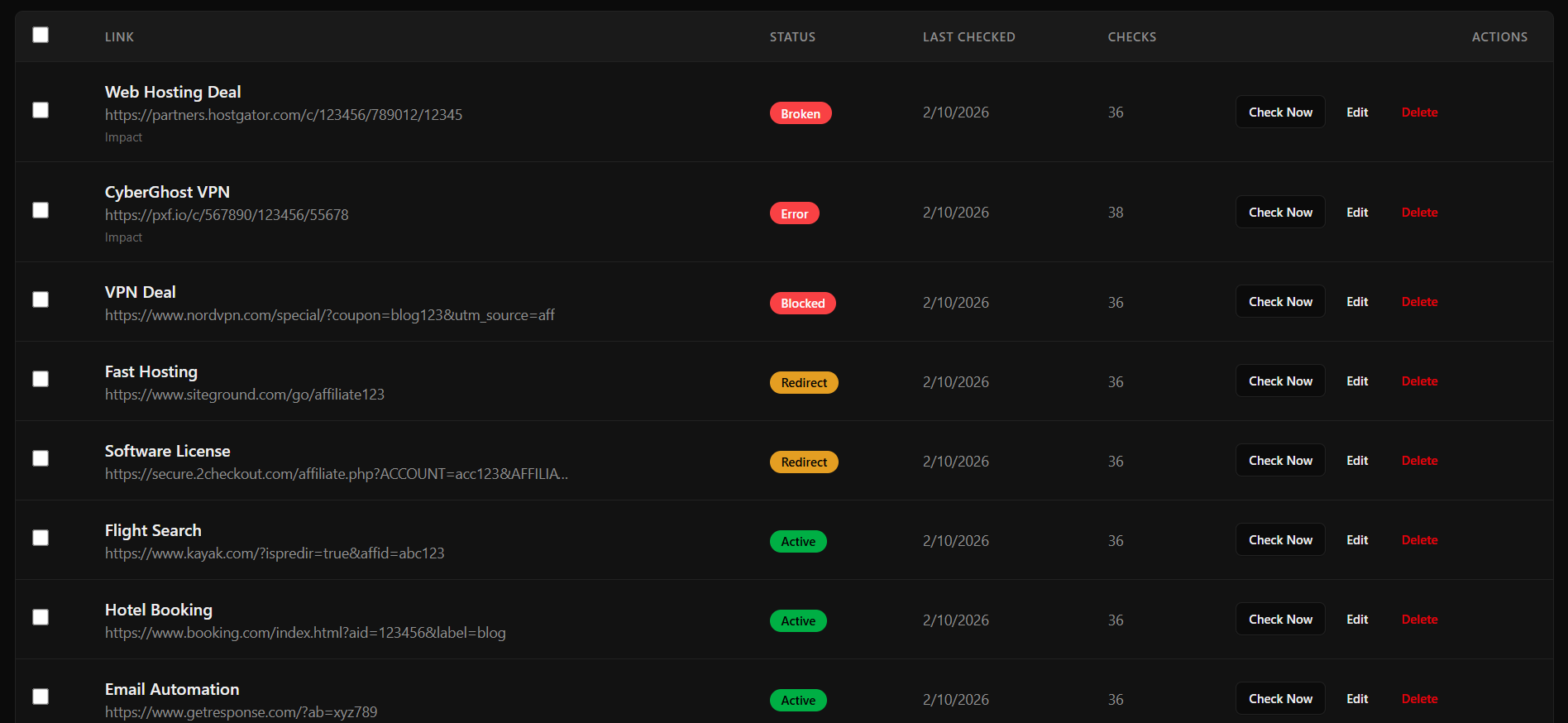
Past 100 links, automated monitoring is the only realistic option. You add your links once, the tool checks them on a schedule, and you get an alert when something breaks. AffilGuard does this for affiliate links specifically, checking status codes, redirect chains, and whether your tracking IDs survive the redirect.
Building Audits Into Your Workflow
The best approach is making link checks part of what you already do, rather than treating audits as a separate event.
When you publish new content: Add every affiliate link in the post to your tracking system immediately. Don't wait until your next audit to discover a link you added last week was already broken.
When you update old content: Check every affiliate link in the post while you're already editing. Takes an extra few minutes and catches problems early.
Monthly: Review your highest-traffic pages. A broken link on a page getting 100 visits a day costs you ten times more than one on a page getting 10.
Quarterly: Full sweep. Check every link, review whether the programs you're promoting still make sense, and clean out anything that's no longer worth the space.
The Bottom Line
Whether you check links manually, use a spreadsheet, or set up automated monitoring, the important thing is that you're checking at all. Broken links don't fix themselves, and every day one sits on your site is a day you're sending traffic to a dead end.
Start with your highest-traffic pages. Work your way down. And once you've been through everything, set up a system so you're catching problems as they happen instead of after they've already cost you.

AffilGuard Team
We help affiliate marketers protect their commissions by monitoring links 24/7 and alerting you when something breaks. Our mission is to ensure you never lose money to broken affiliate links again.
Ready to Protect Your Affiliate Links?
AffilGuard monitors your links 24/7 and alerts you instantly when something breaks. Free for up to 20 links.
Related Articles
Signs Your Affiliate Program Is Dying (Before They Tell You)
Commission cuts rarely come out of nowhere. Learn the warning signs that an affiliate program is in decline, with real examples from Amazon, Walmart, and others.
What Actually Happens When Someone Clicks Your Affiliate Link
A technical deep-dive into the journey of an affiliate click—from the moment someone clicks to when you get paid. Understanding this makes you better at the job.
How to Organize Your Affiliate Links (Without Losing Your Mind)
A practical guide to creating a system that keeps your affiliate links organized, accessible, and easy to maintain—whether you have 10 links or 1,000.