How to Organize Your Affiliate Links (Without Losing Your Mind)

AffilGuard Team

Most affiliate marketers start organized. A spreadsheet here, a bookmark folder there. Then you join a second network, start a seasonal campaign, swap out a few products, and suddenly you're searching three different places for a link you know you saved somewhere.
The cost isn't just wasted time. When you can't find a link, you can't check if it still works. When you can't check it, you don't know it's broken. And when you don't know it's broken, you're sending traffic to a dead page.
Here's a system that stays manageable as you scale.
Why Organization Matters More Than You Think
Disorganized affiliate links aren't just annoying—they cost you money. Here's how:
Broken links go unnoticed
When you can't find a link, you can't check if it still works. Dead links = zero commissions.
Duplicate content
Without a master list, you might promote the same product twice—or miss opportunities entirely.
Wasted time searching
Every minute spent hunting for links is a minute not spent creating content or optimizing campaigns.
Missed changes
Programs change terms, cut rates, or shut down. Without a master list, you won't notice until your earnings drop.
The Simple Folder Structure That Actually Works
Forget complex systems with dozens of subfolders. The best organization is the one you'll actually use. Here's a structure that works for most affiliate marketers:
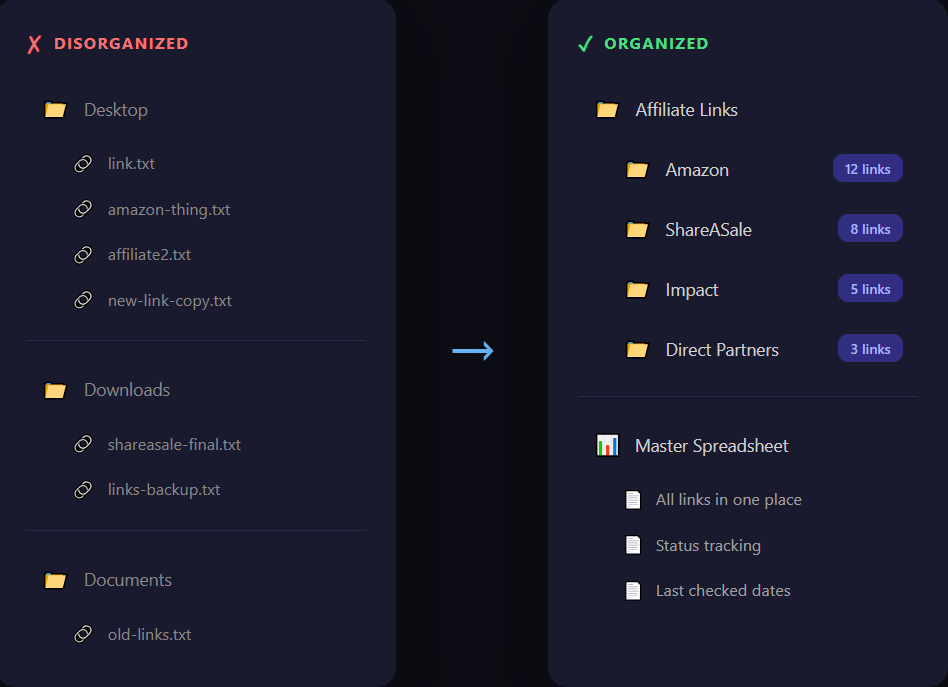
The key insight: organize by network first, not by product type. Why? Because each affiliate network has different login credentials, payment schedules, and link formats. When you need to check on something, you'll think "I need to log into Awin" not "I need to check my kitchen products."
Pro tip: Use your file manager's tags
Both Windows and Mac let you tag files with colors. Use red for expired links, green for top performers, and yellow for links that need attention. This gives you a visual status at a glance.
Building Your Master Spreadsheet
A folder structure is great for storage, but you need a single source of truth for your links. A master spreadsheet gives you one place to see everything you're promoting.
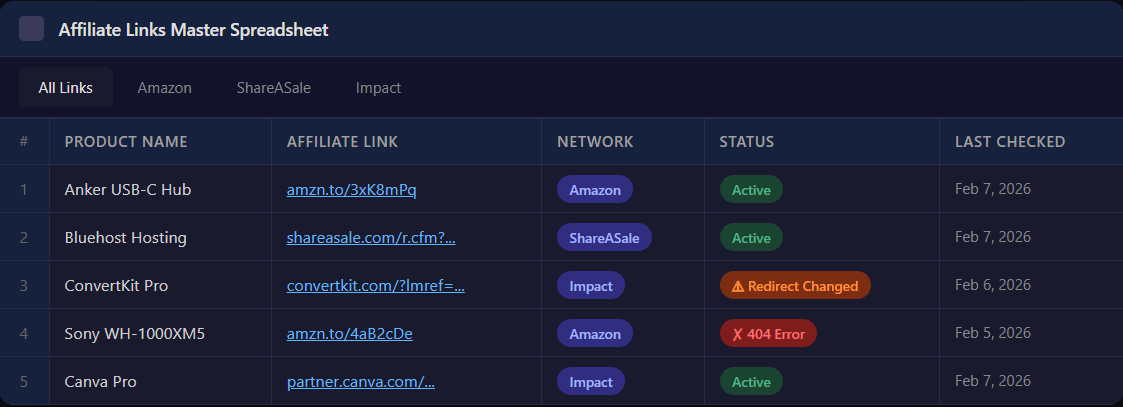
Here are the essential columns every affiliate spreadsheet should have:
Optional columns worth adding: commission rate, cookie duration, where you've used the link (which blog posts, emails, etc.), and monthly earnings.
The "Check Everything" Trap
Here's where most affiliate marketers get stuck: they build a beautiful spreadsheet, then never update it. Why? Because manually checking every link is tedious, time-consuming work.
Let's be honest about what manual link checking actually involves:
The reality of manual checks
- Click each link individually
- Wait for it to load (some are slow)
- Verify the destination page still exists
- Check that your tracking ID is still in the URL
- Update your spreadsheet
- Repeat 50-500 more times...
Even if you're fast, checking 100 links by hand is tedious enough that you'll stop doing it consistently. And inconsistent checking is barely better than no checking.
A Smarter Approach to Link Maintenance
The goal isn't to check your links more often—it's to know immediately when something breaks. That's the difference between proactive and reactive maintenance.
Reactive (The Old Way)
- Check links when you remember
- Discover breaks weeks later
- Lost commissions pile up
- Constant anxiety about link health
Proactive (The Smart Way)
- Automated monitoring runs 24/7
- Instant alerts when issues arise
- Fix problems before they cost money
- No more surprise earnings drops
Automated monitoring tools handle this in the background. You add your links once, the tool checks them on a schedule, and you get an alert when something breaks. AffilGuard does this for affiliate links specifically, checking status codes, redirects, and tracking IDs.

Getting Started Today
You don't have to overhaul everything at once. Start with these three steps:
Organization isn't about perfection. It's about being able to find any link in under a minute and knowing whether it still works. Start with the structure, add your top links, and build from there.

AffilGuard Team
We help affiliate marketers protect their commissions by monitoring links 24/7 and alerting you when something breaks. Our mission is to ensure you never lose money to broken affiliate links again.
Ready to Protect Your Affiliate Links?
AffilGuard monitors your links 24/7 and alerts you instantly when something breaks. Free for up to 20 links.
Related Articles
How to Audit Your Affiliate Links (Step by Step)
Most affiliate marketers don't audit their links until something goes wrong. By then, commissions have already been lost. Here's a practical process for checking every link across your sites.
Signs Your Affiliate Program Is Dying (Before They Tell You)
Commission cuts rarely come out of nowhere. Learn the warning signs that an affiliate program is in decline, with real examples from Amazon, Walmart, and others.
What Actually Happens When Someone Clicks Your Affiliate Link
A technical deep-dive into the journey of an affiliate click—from the moment someone clicks to when you get paid. Understanding this makes you better at the job.