What Actually Happens When Someone Clicks Your Affiliate Link

AffilGuard Team

Most affiliate marketers never think about what happens after someone clicks their link. You grab a URL from your network dashboard, drop it in a blog post, and check your earnings report in a few weeks. Simple enough.
Until it isn't. Clicks show up in your analytics but conversions don't match. A product you promoted for months suddenly stops earning. Your network shows sales you never got credited for. Without understanding how the system actually works, you're left guessing at what went wrong.
This is a look at what happens in the milliseconds after a click, how networks track sales back to you, and where this process commonly fails.
The Redirect Chain
When someone clicks your affiliate link, they don't land directly on the merchant's site. The click passes through one or more intermediate servers first.
A typical path looks like this: your link points to the affiliate network's tracking server. That server logs the click, records your affiliate ID, drops a cookie in the user's browser, and then sends them to the merchant. Sometimes there are additional hops for geographic routing or fraud detection.
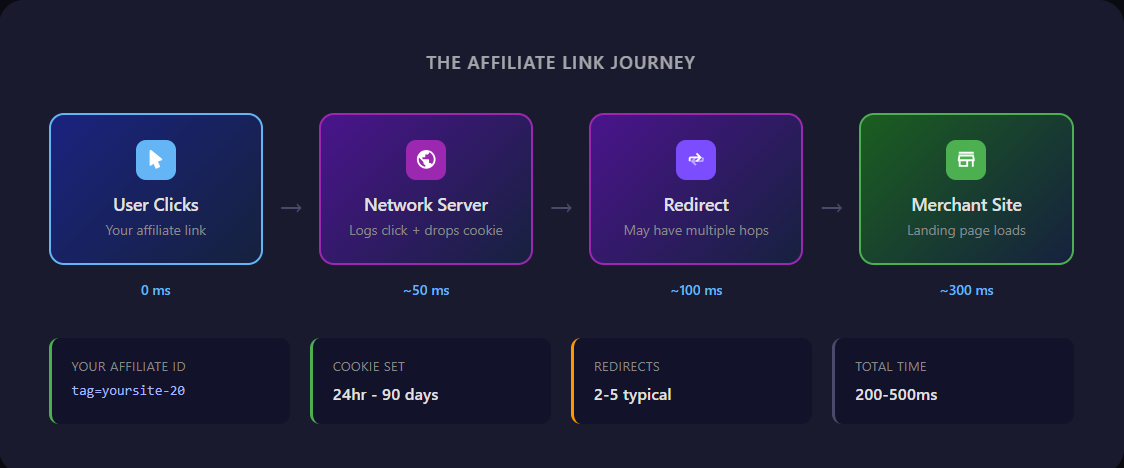
This all happens quickly, often in under a second. But each server in the chain is a potential failure point. A slow response, a misconfigured redirect, or an aggressive browser security setting can break the chain before tracking completes.
Fewer redirects means fewer problems
When comparing affiliate programs, look for simpler redirect chains. Some networks let you see the full path your links take. Two or three hops is typical. The more hops, the more chances for something to break or slow down.
How Tracking Works
Affiliate tracking depends on two things working together: URL parameters and browser cookies.
The Parameters in Your Link
Your affiliate link contains your unique ID somewhere in the URL. On Amazon, it looks like this:
That tag parameter is how Amazon knows the click came from you. When their tracking server sees this request, it logs that affiliate yoursite-20 sent someone to product B08N5WRWNW at a specific time. Different networks use different parameter names. Awin uses afftrack, Impact uses irclickid. Same idea.
Cookies Fill the Gap
URL parameters only work for immediate purchases. What about the customer who clicks your link, looks at the product, and comes back three days later to buy?
This is what cookies handle. When the click passes through the network's tracking server, it stores a small file in the customer's browser containing your affiliate ID and a timestamp. When they eventually purchase, the merchant's checkout page reads this cookie and credits the sale to you.
The shift away from third-party cookies
Safari has blocked third-party cookies entirely since 2020. Chrome announced in 2025 it would give users the choice to opt out. Many affiliate networks now require server-side tracking and first-party cookies as a result. If your network still relies on third-party cookies, you may be losing sales from Safari and Firefox users.
Attribution Windows
Cookies don't last forever. Each program sets an attribution window, the period during which a purchase can be credited to your click. After that window closes, the cookie expires.
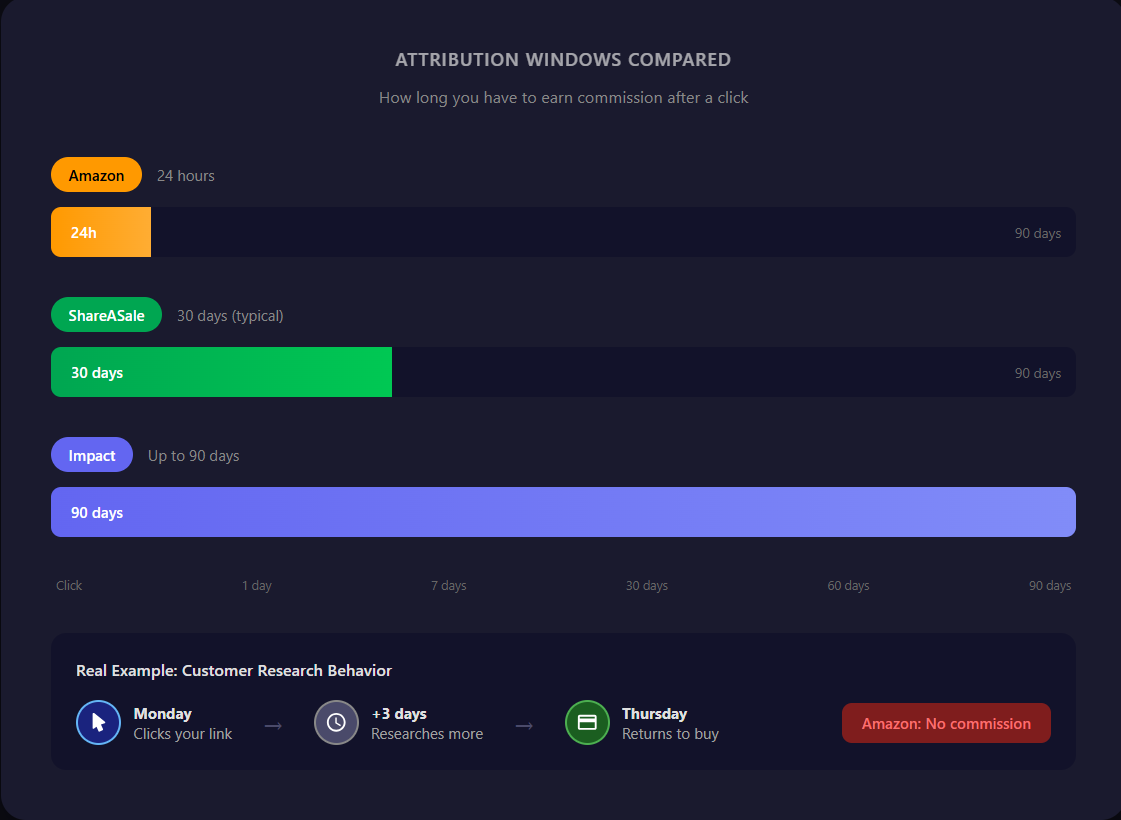
Amazon's window is 24 hours. Customer clicks Monday, researches for three days, buys Thursday? You don't get that sale. They came back through Google or another affiliate's link, and whoever got that last click gets credit.
This isn't Amazon being stingy. Shorter windows mean more predictable marketing costs for them. Longer windows are better for affiliates but blur the line between genuine influence and coincidence. Most networks default to 30 days. Some premium programs offer 60 or 90.
When Someone Actually Buys
The customer clicked your link and the cookie was set. Now they're at checkout. This is where your commission gets recorded.
On the merchant's order confirmation page, there's a small piece of code that runs after purchase. It sends data back to the affiliate network: the order ID, the purchase amount, your affiliate ID from the stored cookie, and a timestamp. The network matches this to your earlier click and credits your account.
But you won't see the money right away. Commissions sit in pending status for 30 to 60 days. This protects merchants from paying out on sales that get returned. If a customer buys through your link and returns the product two weeks later, that commission gets reversed.
This is also why your numbers might not add up. You could have 100 clicks, 10 recorded sales, but only 7 paid commissions because three customers returned their orders.
Where Things Break
The tracking chain has multiple failure points.
Ad blockers can strip tracking parameters from URLs or block cookies entirely. The user arrives at the merchant site, but your ID never made it.
Browser privacy features like Safari's Intelligent Tracking Prevention and Firefox's Enhanced Tracking Protection are designed to stop cross-site tracking. Sometimes affiliate tracking gets caught too.
The merchant's tracking code can break during site updates. Sales happen but never get reported to the network. You'd never know unless you were watching your conversion rates closely.
Redirect failures from a slow server, misconfigured routing, or timeout can send users to the wrong page or nowhere at all.
Cookie overwrites happen when a customer clicks your link, then clicks another affiliate's link for the same product later. Most programs use last-click attribution, meaning your cookie gets replaced.
Link rot is inevitable. Products get discontinued. Programs change their URL structure. Merchants leave networks. Your working link now goes to a 404 or a generic homepage.
What You Can Do About It
You can't control browser privacy settings or whether someone uses an ad blocker. What you can control is how quickly you find out when something on your end breaks.
The affiliates who don't lose money to broken links aren't luckier. They check their links. Either manually, which takes time and usually gets neglected, or with automated monitoring that checks regularly and sends alerts when something goes wrong.
Now when a conversion isn't tracking or a link stops working, you have a framework for figuring out why. Is the link reaching the network? Is the cookie being set? Is the merchant's tracking code working? Knowing the system helps you ask the right questions.

AffilGuard Team
We help affiliate marketers protect their commissions by monitoring links 24/7 and alerting you when something breaks. Our mission is to ensure you never lose money to broken affiliate links again.
Ready to Protect Your Affiliate Links?
AffilGuard monitors your links 24/7 and alerts you instantly when something breaks. Free for up to 20 links.
Related Articles
How to Audit Your Affiliate Links (Step by Step)
Most affiliate marketers don't audit their links until something goes wrong. By then, commissions have already been lost. Here's a practical process for checking every link across your sites.
Signs Your Affiliate Program Is Dying (Before They Tell You)
Commission cuts rarely come out of nowhere. Learn the warning signs that an affiliate program is in decline, with real examples from Amazon, Walmart, and others.
How to Organize Your Affiliate Links (Without Losing Your Mind)
A practical guide to creating a system that keeps your affiliate links organized, accessible, and easy to maintain—whether you have 10 links or 1,000.