Affiliate Link Cloaking: What It Is and When to Use It

AffilGuard Team

If you've spent any time in affiliate marketing, you've probably seen advice to "cloak your links." The concept is simple: replace a long, ugly affiliate URL with a short, branded one on your own domain. Instead of linking to anrdoezrs.net/click-123456-789012?url=https%3A%2F%2Fmerchant.com, your readers see yoursite.com/recommends/hosting.
Most serious affiliate sites do this. But the conversation around cloaking tends to focus on why you should do it while glossing over the tradeoffs. Some of those tradeoffs are significant, and one major affiliate program will terminate your account if you do it wrong.

How It Actually Works
Link cloaking is a redirect. When a reader clicks yoursite.com/recommends/hosting, your server looks up the destination URL in a database, then sends the reader's browser there with an HTTP redirect (typically a 302, which tells search engines the redirect is temporary). The reader ends up on the merchant's page with your affiliate tracking intact.
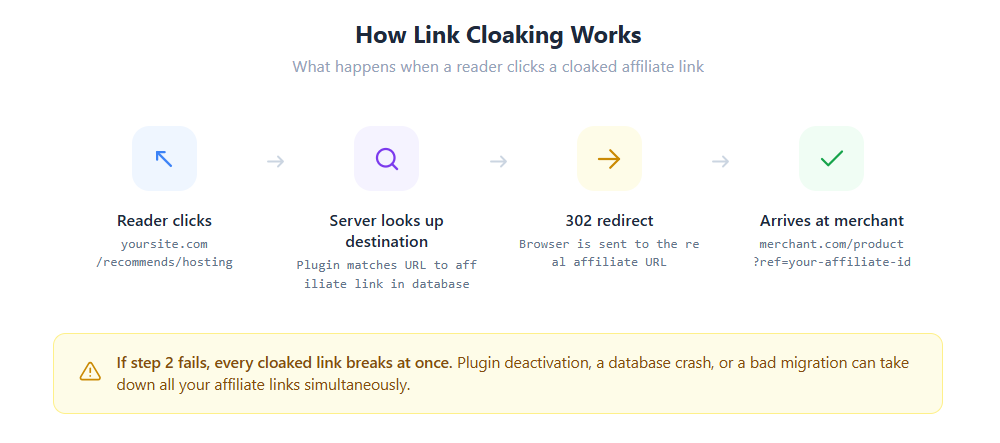
On WordPress, this is usually handled by a plugin. ThirstyAffiliates, Pretty Links, and Lasso are the three most common options. Each stores your affiliate URLs in a database and creates branded redirect URLs under a prefix you choose (/recommends/, /go/, /refer/, etc.).
The redirect happens server-side through PHP. Your WordPress installation loads, the plugin intercepts the request, finds the matching destination in its database, and issues the redirect. ThirstyAffiliates Pro also offers an htaccess-based redirect that bypasses WordPress and PHP entirely, which is faster but requires more server access.
Why People Cloak
There are a few practical reasons, and they're all legitimate.
Raw affiliate URLs look like spam. A link to click.linksynergy.com/deeplink?id=ABC123&mid=456&murl=https%3A%2F%2F... doesn't inspire confidence, especially for readers who are already cautious about clicking unfamiliar links. A branded URL on your domain looks like an internal page. It communicates that you stand behind the recommendation.
Centralized management saves real time. If a merchant changes their affiliate link structure, moves to a different network, or updates their tracking parameters, you update the destination once in your cloaking plugin. The change applies everywhere the cloaked URL appears on your site. Without cloaking, you'd need to find and replace every raw affiliate link across potentially hundreds of pages.
Click tracking gives you data the networks don't. Affiliate networks tell you about conversions. Cloaking plugins tell you about every click, including which pages and placements drive the most traffic to each link. That's information you can act on.
It protects against one specific type of commission theft. With raw affiliate links, your affiliate ID is visible in the page's HTML source code. Malicious browser extensions or scripts can scan for known affiliate URL patterns (Amazon's tag=, for example) and swap your ID for theirs. Cloaking hides the affiliate ID from the page source, since the branded URL contains no tracking information. The ID only appears during the server-side redirect, which scripts reading your HTML can't see.
That said, cloaking does not protect against cookie stuffing. Browser extensions that overwrite your tracking cookie at checkout don't need to read your affiliate ID from the page. They simply replace whatever cookie exists with their own. The PayPal Honey case in late 2024 illustrated the scale of this problem: a class action complaint alleged that Honey replaced creators' affiliate cookies through hidden background redirects. Rakuten subsequently terminated Honey from its network, and Impact removed Honey from its Discovery Marketplace.
Which Networks Allow It
This is where a lot of guides get vague. Here's what the actual policies say.
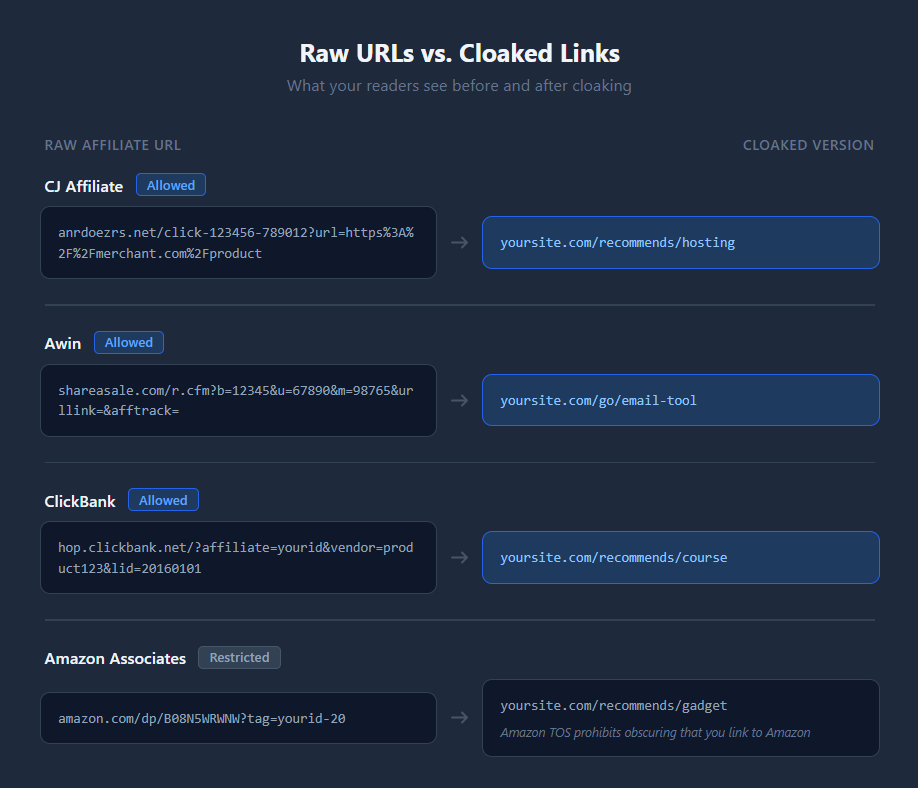
Amazon Associates: Cloaking Restricted
Amazon has the most explicit policy. Their Participation Requirements state: "You will not cloak, hide, spoof, or otherwise obscure the URL of your Site containing Special Links... such that we cannot reasonably determine the site or application from which a customer clicks through." They also prohibit using "a link shortening service, button, hyperlink or other ad placement in a manner that makes it unclear that you are linking to an Amazon Site." Violation can result in account termination. If you use Amazon links, either leave them raw or use Amazon's own amzn.to shortener.
ClickBank explicitly allows redirect-based cloaking but prohibits iframe masking (where the merchant's page loads inside a frame while your URL stays in the address bar). Their HopLinks Guide states: "Yes, you can use tools to shorten or cloak a HopLink," but adds that "masking functionality must be removed from your forwarding domain."
CJ Affiliate has no blanket prohibition. Their compliance guidance focuses on not modifying advertiser tracking codes and complying with individual advertiser terms. Community consensus among CJ publishers is that standard redirect-based cloaking is allowed.
Awin and Impact don't have publicly accessible policies that address cloaking by name. Their terms emphasize transparent traffic sourcing and proper tracking attribution. In practice, redirect-based cloaking is widely used by publishers on both networks.
Rakuten also lacks a public cloaking policy, but partnered with Marcode in early 2025 to detect fraudulent cloaking techniques. They're actively watching for abuse, so publishers on Rakuten should be especially careful to keep redirects transparent and tracking intact.
What Can Go Wrong
Cloaking isn't free. It adds a dependency between your revenue and a WordPress plugin, and that dependency has documented failure modes.
Plugin deactivation breaks every link at once. If your cloaking plugin is deactivated, uninstalled, or crashes, every cloaked URL across your entire site returns a 404 error. There's no graceful degradation and no fallback to the raw affiliate URL. The link data stays in your database, but without the plugin's redirect engine, the URLs are dead. ThirstyAffiliates and Pretty Links both confirm this in their support documentation. If you have cloaked links in hundreds of posts, a single plugin failure takes them all down simultaneously.
Migrations can silently drop your links. Pretty Links stores data in custom database tables (wp_prli_links, wp_prli_link_meta, wp_prli_clicks). Standard WordPress migration tools that only export core tables can leave these behind. ThirstyAffiliates has documented cases of links returning 404 after major version upgrades (v2 to v3). Pretty Links has a dedicated support article titled "All my Pretty Links have disappeared!" addressing database table crashes.
Switching cloaking services orphans every shared link. If you've shared cloaked URLs in emails, on social media, in YouTube descriptions, or on other sites, those URLs are tied to your current plugin's routing. Switching to a different cloaking tool means every externally shared link breaks permanently.
The SEO Side
Google's position on affiliate link redirects is straightforward. John Mueller, Google's Search Advocate, has stated that using 302 redirects for affiliate links is "perfectly fine." He has also stated that websites won't receive a manual penalty for affiliate links without the recommended markup, though he strongly recommends using rel="sponsored" or rel="nofollow".
But there is a nuance specific to cloaked links. Raw affiliate URLs are algorithmically recognizable: Google knows what amazon.com/dp/B123?tag=yourid-20 is. A cloaked link like yoursite.com/recommends/hosting looks like an internal page. If you forget the rel="nofollow" or rel="sponsored" attribute, Google may treat these as followed internal links that pass PageRank to commercial sites. At scale, this can create an unnatural outbound link pattern.
The fix is simple: always apply rel="nofollow" or rel="sponsored" to cloaked affiliate links. ThirstyAffiliates, Pretty Links, and Lasso all have settings to do this automatically. Just make sure it's turned on.
Cloaking vs. Link Management
These terms get used interchangeably, but they're different. Cloaking is a single function: transforming a URL via redirect. Link management is a broader system that includes cloaking alongside click tracking, analytics, categorization, bulk URL updates, broken link detection, and performance reporting.
The distinction matters because cloaking alone doesn't solve the bigger problem. You can have perfectly branded URLs that all redirect to 404 pages because a merchant restructured their site. Cloaking makes your links look good. Management (including monitoring whether they actually work) keeps them functional.
If you're going to invest in one, invest in the management side. A broken link with a pretty URL still earns zero commissions.
Should You Cloak Your Links?
For most affiliate sites, the answer is yes, with conditions.
If you use Amazon Associates, don't cloak those links. Amazon's policy is explicit, and losing your Associates account over URL aesthetics isn't worth it. Use Amazon's amzn.to shortener if you need a shorter URL.
For other networks, standard redirect-based cloaking is widely accepted and practically useful. The centralized management and click tracking alone justify the setup. Use 302 redirects (not 301s), apply rel="sponsored" to every cloaked link, and make sure your FTC disclosure is in place regardless of whether your links are cloaked.
But don't treat cloaking as "set and forget." The plugin that powers your cloaked links is a single point of failure for your entire affiliate revenue. Keep it updated. Back up your link database separately from your regular WordPress backups. And monitor the destination URLs, not just the cloaked surface. A redirect that successfully points to a dead page is still a dead page.
Cloaking cleans up what the reader sees. Regular audits verify what's actually happening behind the redirect. You need both.

AffilGuard Team
We help affiliate marketers protect their commissions by monitoring links 24/7 and alerting you when something breaks. Our mission is to ensure you never lose money to broken affiliate links again.
Ready to Protect Your Affiliate Links?
AffilGuard monitors your links 24/7 and alerts you instantly when something breaks. Free for up to 20 links.
Related Articles
Affiliate Marketing Mistakes That Cost Real Money
Most affiliate revenue loss isn't caused by sudden disasters. It's caused by quiet, compounding mistakes that go unnoticed for months. Here are the ones that cost the most and how to fix each one.
Your Affiliate Links Aren't Converting (And It Might Not Be Your Content)
You optimized the headline, rewrote the CTA, and your traffic is solid, but conversions still dropped. Before you blame the content, check the link itself. Dead landing pages, stripped tracking parameters, slow redirect chains, and browser cookie restrictions are silently killing affiliate revenue across the industry.
Affiliate Program Changes That Could Kill Your Income
Commission rate cuts, program closures, network bans, and platform migrations can wipe out affiliate income overnight. Here's a documented history of the biggest changes and a practical plan for protecting yourself.